| * Aux. Power AC 85 ~ 265V or DC 85 ~ 300V |
| * High Accuracy 0.1% RO at 23oC ± 5oC |
| * Input / Output User Selectable |
| * PC Plastic Case, DIN Rail or Wall Mounting |
| * High Dielectric Strength (AC 1.5KV/Min, between Input / Output / Power) |
|
|
|
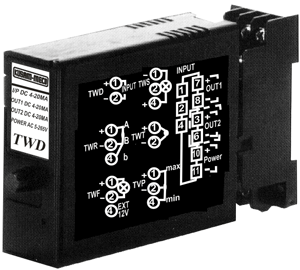
| TERMINAL CONNECTIONS |
| Connect the unit as in the diagram on the right side or refer to the connection diagram label on the side of the unit. |
| CHECKING |
* Terminal wiring : Check that all cables are correctly connected according to the connection diagram.
* Power input voltage : Check voltage of the terminal 10 ' 11
* Input : Check that the input signal is within 0-100%.
*Output : Check that the load resistance meets the described specifications. |
| ADJUSTMENT PROCEDURE |
* This unit is calibrated at the factory to meet the ordered specifications, therefore you usually do
not need any calibration.
* For matching the signal to a receiving instrument or in case of regular calibration, adjust the output
as explained in the following. |
| HOW TO CALIBRATE THE OUTPUT SIGNAL |
1) ZERO : Apply 0% input and adjust output to 0%.
2) SPAN : Apply 100% input and adjust output to 100%.
3) Check ZERO adjustment again with 0% input.
4) When ZERO value is changed, repeat the above procedure 1) ~ 3). |
| MAINTENANCE |
| Regular calibration procedure is explained below : |
Warm up the unit for at least 10 minutes. Apply 0%, 25%, 50%, 75% and 100% input signal. Check the output signal for the respective input signal remains within accuracy described in the data sheet. When the output is out of tolerance, recalibrate the unit according to the "ADJUSTMENT PROCEDURE" explained earlier. |
| CALIBRATE THE RANGE OF THE INPUT AND OUTPUT |
|